
Analytics sponsors can trust.
Rat gives sponsors a detailed live report they can check. Track clicks on your own domain, flag bots and compare your cost per click with paid ads. Show what a placement delivered when it's time to renew.
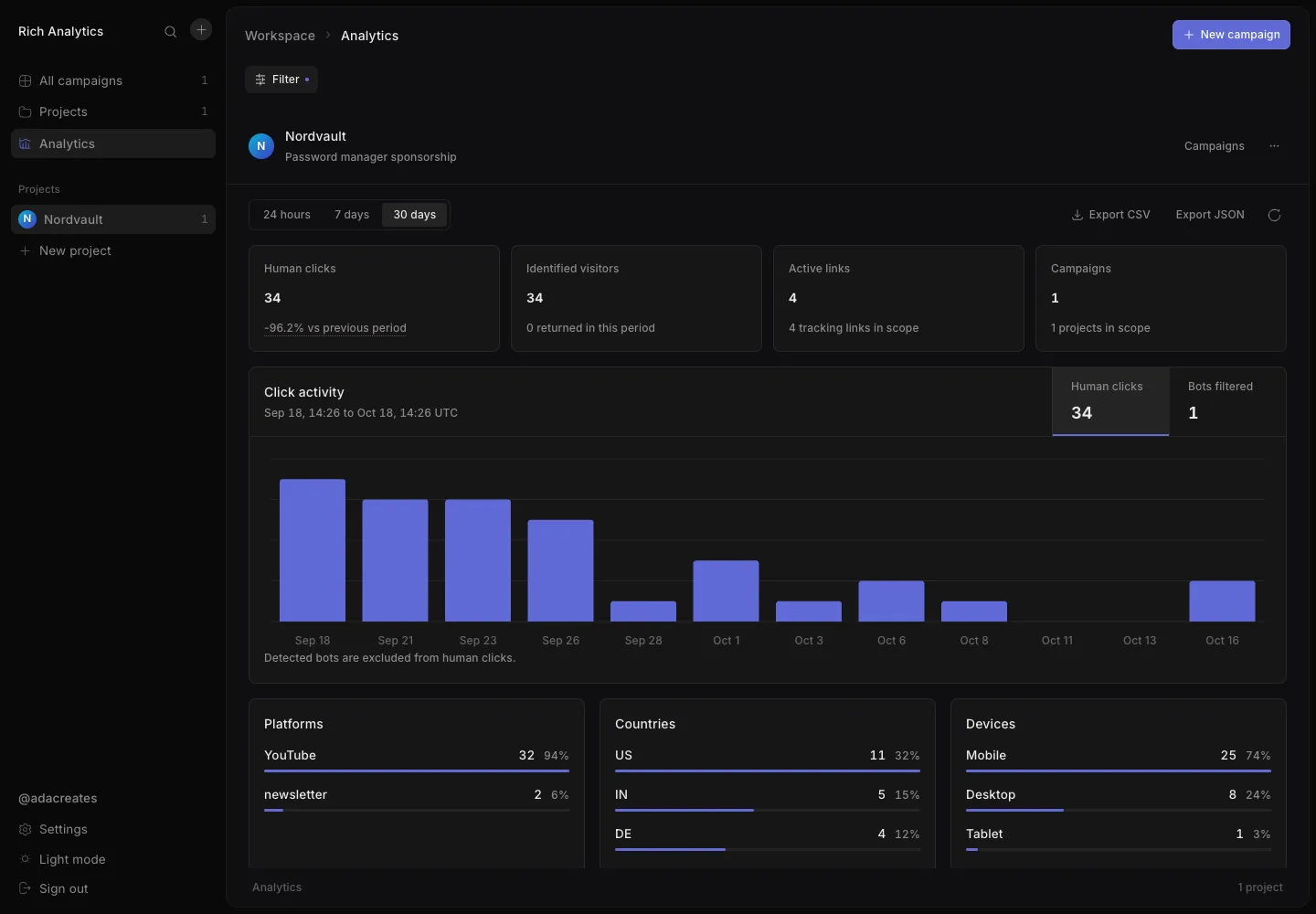
Features
- Projects, campaigns and links
- Organize work by client. Rat creates a tracking link for each of ten platforms when you add a campaign. You can add custom links by hand.
- Click tracking
- Every short link redirects and records the time, country, device, OS, browser and referrer. Rat flags bots.
- Analytics dashboard
- View platform efficiency, global reach, a golden-hour heatmap, loyalty and velocity over 24 hours, 7 days or 30 days. Export clicks as CSV or JSON.
- Sponsor kit
- Check traffic quality, geo value, decay and deal value for each campaign. Share the results with sponsors through a read-only report link.
- Audience counts
- Rat reads follower counts from public YouTube, Instagram and X pages. A Twitch adapter is optional.
- Self-hosted, MIT licensed
- Run the Laravel API, Next.js app and MongoDB on your own infrastructure.
Rat records clicks and flags bots.
Short links run on your own domain. Rat redirects each visitor and records the time, country, device, browser and referrer. Unknown or disabled links send visitors to your app.
- 14:26:31/nv-ttAUtablet · iPadOS · Safaritiktok.comhuman
- 14:26:23/nv-newsINmobile · Android · Chromenewsletterhuman
- 14:26:19/nv-xCAdesktop · macOS · Firefoxx.comhuman
- 14:26:15/nv-ytDEdesktop · Linux · curl—bot
- 14:26:11/nv-igGBmobile · Android · Chromeinstagram.comhuman
- 14:26:03/nv-ytUSmobile · iOS · Safariyoutube.comhuman
Sample data. Human click counts exclude flagged bots.
- Country lookup
- Connect the free MaxMind GeoLite2 City database to see which country each click came from. Without it, country data shows as unknown.
- Repeat visitors
- Turn on visitor tracking to count repeat visitors with a signed first-party cookie instead of IP addresses. It's off by default.
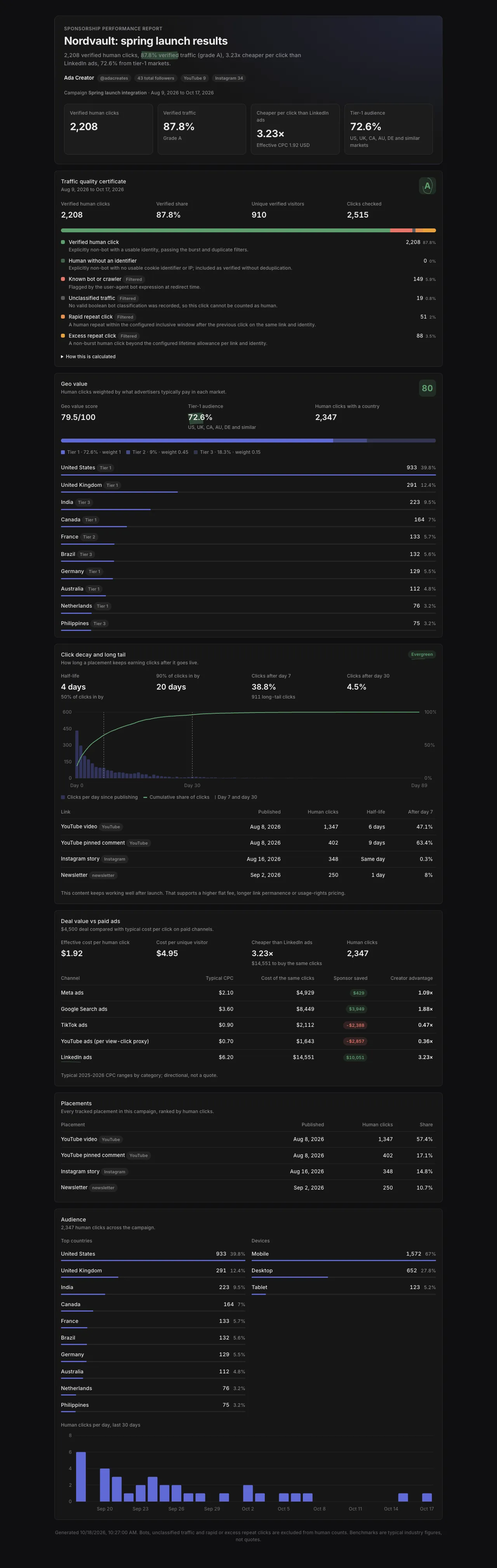
Numbers a sponsor can check for themselves.
Open a campaign and choose Sponsor kit. Check traffic quality, see which countries clicks came from and how traffic changed over time. Enter the sponsor's payment to calculate cost per click.
Traffic quality certificate
Spring launch · Aug 9 to Oct 17
- Verified human clicks
- 2,208
- Verified click share
- 87.8%
- Clicks checked
- 2,515
- Verified human click2,20887.8%
- Known bot or crawlerFiltered1495.9%
- Unclassified trafficFiltered190.8%
- Rapid repeat clickFiltered512.0%
- Excess repeat clickFiltered883.5%
- Traffic quality certificate
- A grade from A to D based on the share of verified human clicks. Rat counts bots, unclassified traffic, rapid bursts and repeat clicks separately.
- Geo value score
- Weights human clicks by country using advertising-value tiers. Clicks from higher-value markets carry more weight.
- Decay curve and long tail
- How clicks build up after a placement goes live, and how much traffic still arrives after day 7 and day 30.
- Deal value
- Enter what the sponsor paid to see the effective cost per click next to Meta, Google Search, TikTok, YouTube and LinkedIn ads.
Edit benchmarks, exchange rates, geo tiers and grade thresholds to fit your market, and treat the benchmarks as estimates.
Share a live report with sponsors.
Create a read-only report for any campaign and choose which sections to share. Set an expiry and check view counts. You can turn the link off or regenerate it at any time.
- Hashed tokens
- Rat stores report tokens as SHA-256 hashes and shows the full URL only once.
- No search indexing
- Report pages ask search engines not to index them, and never pass their private link on to other sites.
- No sign-in
- Sponsors open the link directly. The public endpoint allows 60 requests a minute.
Run Rat locally in four steps.
All you need is PHP, Node.js and MongoDB. Run the database locally, on Atlas or with the included Docker setup.
Get the code and start MongoDB
$ git clone https://github.com/jordansmalls/rat$ cd rat$ docker compose up -d # optional: MongoDB on :27017, Mailpit on :8025Set up the API
$ cd api$ cp .env.example .env$ composer setup # dependencies, APP_KEY and MongoDB indexes.env.examplepoints at a local MongoDB. To use Atlas, setMONGODB_URIandMONGODB_DATABASE.Set up the web app
$ cd ../web$ pnpm install$ cp .env.example .env.localStart Rat
$ cd ../api$ composer devStarts the API on
:4000, a queue worker, the log viewer and Next.js on:3000. Openlocalhost:3000, create an account, choose a handle and add your socials.Load sample data
$ php artisan rat:seed-demo --email=you@example.comAdds fictional projects, campaigns and clicks to your account without replacing existing data. You can rerun it. Use
--dry-runto see what it would insert.
Ports and URLs
- SERVER_PORT, APP_URL4000Where the API runs · api/.env
- BASE_URLhttp://localhost:4000Origin of short links · api/.env
- FRONTEND_URLhttp://localhost:3000CORS, emails, report links · api/.env
- API_URLhttp://localhost:4000Next.js proxy destination for /api and /sanctum · web/.env.local
Deploy Rat on your own domain.
Run Laravel and Next.js on separate hostnames, both behind HTTPS. Laravel handles short links. Next.js serves the dashboard and forwards API calls to Laravel from the server. You don't need to configure CORS.
Domains
- go.example.comLaravelShort links, the API and the /up health check
- app.example.comNext.jsDashboard, sign-in and sponsor reports
- MongoDBAtlas or your own serverOnly Laravel connects to it
Point each domain's DNS at the server that runs it. Laravel needs a hostname of its own because short links live at the root path.
Configure the API
APP_ENV=productionAPP_DEBUG=falseAPP_URL=https://go.example.comBASE_URL=https://go.example.comFRONTEND_URL=https://app.example.comSANCTUM_STATEFUL_DOMAINS=app.example.comSESSION_SECURE_COOKIE=trueTRUSTED_PROXIES=… # the Next.js server and any load balancer or CDNMONGODB_URI=mongodb+srv://…MONGODB_DATABASE=ratAdd these settings to
api/.env. SetBASE_URLbefore creating links. Each link stores its full URL at creation.Install the API
$ cd api$ composer install --no-dev --optimize-autoloader$ php artisan key:generate # first deploy only$ php artisan migrate --force # creates the MongoDB indexesServe
api/publicon the short-link domain, with themongodbPHP extension installed. Any setup that runs Laravel works, such as nginx with PHP-FPM.Build and start the dashboard
$ cd ../web$ pnpm install --frozen-lockfile$ pnpm build$ pnpm start # serves on :3000Set
API_URLinweb/.env.localbefore you build. Next.js writes the proxy rules at build time. Use Laravel's private address if both apps share a server or network. Otherwise, use its public URL. Runpnpm startunder a process manager and point the dashboard domain at it.
Before you go live
- Real visitor IPs
- Clicks need each visitor's real IP for country lookup and bot filtering. Tell Laravel which proxies and load balancers to trust, or every click records the proxy's address instead.
- Password resets and email verification send mail. Connect a mail provider before launch, because by default emails only go to the log.
- IP retention
- Rat keeps stored IPs until you remove them. To enforce a retention period, schedule the built-in purge command and follow the IP retention runbook in the repo.
- No queue worker
- Rat doesn't run background jobs, so there's no queue worker to set up in production.
Laravel, Next.js and MongoDB.
A Laravel API serves short links and analytics, and a Next.js app runs the dashboard. It's built on Prism, a Next.js + Laravel starter kit.
- API
- Laravel 13, PHP 8.3+, MongoDB, Sanctum, Pest
- Web
- Next.js 16, React 19, TypeScript
- Data and forms
- TanStack Query v5, React Hook Form, Zod 4
- UI
- Tailwind CSS 4, shadcn/ui, shadcn charts, Magic UI, Hugeicons, Sonner
- Tooling
- Pint, ESLint, Prettier, Vitest, GitHub Actions, Laravel Boost
A JSON API under /api/v1.
Responses wrap the result in a data key. Validation errors return 422 with message and errors fields. Requests for another user's resource return 404.
- GET/{slug}Redirect and record a click
- POST/api/v1/campaignsCreate a campaign with ten platform links
- POST/api/v1/campaigns/manualAdd a custom link to a campaign
- GET/api/v1/analytics/overviewWorkspace totals for 24h, 7d or 30d
- GET/api/v1/analytics/project/{id}/{metric}Heatmap, velocity, loyalty and ten more
- GET/api/v1/analytics/project/{id}/exportClicks as CSV or JSON
- GET/api/v1/analytics/campaign/{id}/deal-valueCompare effective CPC with paid ads
- POST/api/v1/sponsor-reportsCreate a share link
- GET/api/v1/public/reports/{token}Public report data without sign-in
Privacy and security.
- Raw IPs stay internal
- Rat uses raw IPs for country lookup and bot filtering. It excludes them from API responses and exports.
- IP retention
- A built-in command removes stored IPs from clicks older than the retention period you choose, and keeps the clicks. It only reports what it would remove until you confirm.
- Cookie sessions
- Sessions use HTTP-only Sanctum cookies with CSRF protection. Rat rate limits auth endpoints and public reports.
- Privacy law
- Check that your data collection complies with the privacy laws in your region before you go live.
Build analytics for your clients.
Rat started as freelance client work. Fork this open-source version and adapt it for your clients. CI runs Pest and Vitest tests on every push. Coding agents can read the project conventions in AGENTS.md files at the root, in api/ and in web/.